

Envision360
Schedule a call
Case Study: Mobile Workflow & Asset Management Platform | Envision360

Case study

Mobile workflow and asset management platform

This client ran a distributed operation with internal staff and external partners. Work moved fast, but updates did not. Approvals lived in email threads. Files were duplicated across folders. The team could deliver, they just could not see the full picture in one place.

U.S.-based service organization Mobile-first workflows Asset control and approvals
Clear ownership

Every item has a single source of truth, with a simple trail of who did what and when.

Faster sign-offs

Approvals are built into the flow, so managers are not chasing updates in five places.

Less rework

Version history is visible and enforced, so the team stops moving the wrong file forward.


Client at a glance

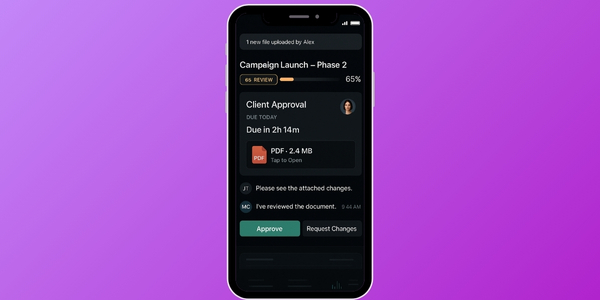
They needed a system that feels normal on a phone. Not a desktop tool squeezed into a small screen. The goal was straightforward: make daily work easier without turning everything into a “process project.”
  • Type: Mid-sized services operation with a field component
  • Teams: Internal staff plus partner teams
  • Focus: Shared visibility, controlled assets, quick approvals
Mobile approvals and workflow overview

Challenge

The operation was capable. The tools were not connected. Small delays were stacking into real delivery problems. When someone asked, “Where is this at?”, the answer depended on who you asked.
  • Status: Project progress was hard to confirm in real time.
  • Versions: Files were duplicated, renamed, and forwarded without clarity.
  • Approvals: Reviews drifted because they were buried in messages.
  • Coordination: Managers spent hours each week just lining up updates.
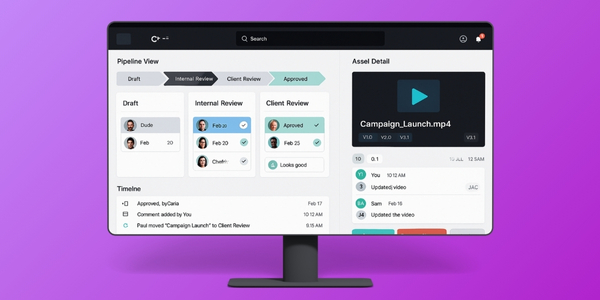
Project visibility and asset version control improvements

Solution

We built one platform that keeps work, assets, and approvals together. It is simple by design. People can open a job, see the latest file, leave a comment, and approve or send it back without switching tools.

Workflow that matches the real job

Stages and handoffs reflect how teams already work, with clear status and accountability.

  • Statuses that read like plain English
  • Automatic reminders when work is waiting
  • Activity history without extra effort

Assets with enforced versions

One place to upload, review, and move forward, with a visible history that prevents drift.

  • Preview before download
  • Role-based access by team
  • Change trail for audit needs

Approvals built for mobile

Quick decisions from a phone, without losing context or creating a second conversation elsewhere.

  • Push notifications for time-sensitive items
  • Comments stay attached to the asset
  • Offline-friendly flow with safe sync
Pilot first

We started with one workflow and one team, then expanded once it felt natural.

Less friction

Every screen was trimmed down to what a person needs in the moment.

Admin control

Roles, access, and auditing were included from day one, not bolted on later.


How we delivered it

The build was run in short cycles. Each cycle ended with something the team could actually use. That kept feedback honest and prevented the usual “looks good in a meeting” problem.

  • Week 1–2: map the workflow, define roles, and lock the first pilot scope
  • Week 3–6: ship the core flow, asset storage, and approval loop
  • Week 7–10: expand views, harden permissions, and clean up edge cases

What stayed consistent

We protected two things the entire time: clarity and speed. If a screen needed an explanation, we simplified it. If a step created delay, we reworked it until the flow felt obvious.


Outcomes in the first 60 to 90 days

The early wins were not flashy. They were practical. People stopped asking where things were, and approvals stopped getting lost. That alone changed the pace of delivery.

Same-day approvals became normal Most requests that used to sit for a day or two were being approved within the same business day once notifications and in-app sign-off were live.
Fewer “wrong file” handoffs Version confusion dropped quickly because teams could only move forward with the latest approved asset, with history visible to everyone.

Client name is withheld. Outcomes are based on early usage patterns and internal feedback captured during the rollout period.


What is next

After the core flow stabilized, the conversation shifted from “make it work” to “make it smarter.” The next phase focuses on connecting the platform to the tools they already use, without adding noise.

  • Integrations with external review tools
  • Expanded partner access rules by project type
  • Lightweight reporting for forecasting and capacity planning

A note on scope

This was not a giant rebuild. It was a focused platform designed to remove daily friction. The goal was a system people adopt because it makes their day easier, not because they were told to use it.

Schedule a call Or send a note and we will respond with a clear next step.